This web page was set up to provide users with the necessary information and tools to safely and completely remove VirusBursters.
What is VirusBursters?
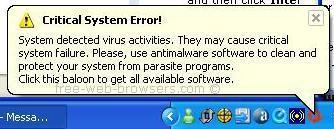
VirusBursters (aka VirusBurst & VirusBurster) uses a Trojan horse to infect computers with an adware program. The adware program displays pop-up balloon messages warning the user about virus activities which do not actually exist. It is designed to scare the user into purchasing VirusBursters to remove the reported fake virus infection. VirusBursters uses the same deceptive practices as the spyware programs it's supposed to remove. It may also hijack your web browser's homepage and install other programs without your knowledge and consent. To completely remove VirusBursters, you need to make sure that the adware program, Trojan horse and any other associated components have been completely removed from your computer.
VirusBursters False Alert
Remove VirusBursters
VirusBursters has the ability to re-install itself using a hidden installer, and can evade most anti-virus and anti-spyware products. To safely remove VirusBursters and all of its hidden components we recommend using only a reputable anti-spyware program such as STOPzilla. Manual removal procedures may not locate all of the hidden components and can also put your operating system at risk. STOPzilla is recommended because it has a proven track record with this pest, is 100% guaranteed and is completely safe to use:
Scan your system with STOPzilla removing all detected infections.
Reboot your PC
Scan your system again to ensure the removal process is complete.
STOPzilla was updated on 20th October 2010 (software v7.0.1, database v432) to remove the latest VirusBursters variants. If the infection persists even after using STOPzilla, do the following steps to automatically raise a support ticket:
Ensure you are connected to the Internet
Open STOPzilla program
Click Backup List on the STOPzilla Menu
Click Email Log File
Double Click on the latest STOPzilla log
Type in all the details of your issue
Send the email
To mitigate the chances of future infections from malicious programs such as VirusBursters it's important to keep your PC up-to-date with the latest Windows security updates and use a reputable anti-spyware program such as STOPzilla.
If you have any questions regarding VirusBursters removal please feel free to contact us.
Free-Web-Browsers.com
P.S. If you found this information useful please link to us to help others remove VirusBursters - Spread The Word.
The owner of this website is NOT affiliated with VirusBursters and does NOT endorse VirusBursters.