VirusBurst removal guide to help users to remove VirusBurst, its Trojan horse and deceptive pop-ups.
VirusBurst Behavior
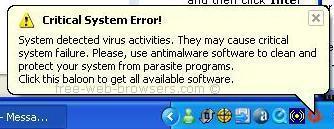
VirusBurst is a deceptive program that uses a Trojan horse to secretly infect computers with an adware program. The adware program displays deceptive ads in the form of fake alert messages designed to scare the computer user into buying VirusBurst to remove the reported infections. In its previous versions VirusBurst was known as SpywareQuake, SpyFalcon, VirusRescue, SpyAxe and SpywareStrike. Like its forebearers, VirusBurst blatantly uses exactly the same tactics as the spyware programs it's supposed to remove, so is in itself "spyware". VirusBurst can also change the browser homepage (browser hijack) and it's also possible for the Trojan horse component to install other programs without user consent. To remove VirusBurst and it's pop-ups without any chance of re-infection, the adware program as well as any associated installers and Trojan horses need to be properly removed from your PC.
VirusBurst Fake Alert
How to Remove VirusBurst
VirusBurst is updated often and also has the ability to evade most antispyware progams and manual removal attempts by re-installing itself from a hidden installer. To remove VirusBurst and all of its hidden components, I recommend using STOPzilla. STOPzilla is reputable, has a 100% guarantee of success and is completely safe to use:
Scan your system with STOPzilla removing all infections.
Reboot your PC
Scan your system again to make sure the removal has worked.
STOPzilla was updated on 20th October 2010 (software v7.0.1, database v432) to remove the latest VirusBurst variants. If the infection persists do the following steps to automatically raise a support ticket:
Ensure you are connected to the Internet
Open STOPzilla program
Click Backup List on the STOPzilla Menu
Click Email Log File
Double Click on the latest STOPzilla log
Type in all the details of your issue
Send the email
To prevent future infections from malicious and rogue programs such as VirusBurst it's important to always install the latest Windows security updates and use a reputable anti-spyware product such as STOPzilla that provides real time protection.
If you have any questions regarding VirusBurst removal please feel free to contact me.
Free-Web-Browsers.com
P.S. If you found this information useful please link to us to help others remove VirusBurst - Spread The Word.
The owner of this website is NOT affiliated with VirusBurst and does NOT endorse VirusBurst.